Patman patch manager
This tool is a Python script which:
Creates patch directly from your branch
Cleans them up by removing unwanted tags
Inserts a cover letter with change lists
Runs the patches through checkpatch.pl and its own checks
Optionally emails them out to selected people
Links the series automatically to Patchwork once sent
It also has some Patchwork features:
Manage local series and their status on patchwork
Show review tags from Patchwork and allows them to be gathered into commits
List comments received on a series
It is intended to automate patch creation and make it a less error-prone process. It works with any git project that sends patches by email. The checkpatch and get_maintainer steps follow the U-Boot and Linux kernel conventions and can be skipped for projects that do not use them.
It is configured almost entirely by tags it finds in your commits. This means that you can work on a number of different branches at once, and keep the settings with each branch rather than having to git format-patch, git send-email, etc. with the correct parameters each time. So for example if you put:
Series-to: fred.blogs@napier.co.nz
in one of your commits, the series will be sent there.
In Linux and U-Boot this will also call get_maintainer.pl on each of your patches automatically (unless you use -m to disable this).
Installation
You can install patman using:
pip install patch-manager
The name is chosen since patman conflicts with an existing package.
The source code is hosted at https://github.com/nxtboot/patman
How to use this tool
This tool requires a certain way of working:
Maintain a number of branches, one for each patch series you are working on
Add tags into the commits within each branch to indicate where the series should be sent, cover letter, version, etc. Most of these are normally in the top commit so it is easy to change them with ‘git commit –amend’
Each branch tracks the upstream branch, so that this script can automatically determine the number of commits in it (optional)
Check out a branch, and run this script to create and send out your patches. Weeks later, change the patches and repeat, knowing that you will get a consistent result each time.
How to configure it
If your project ships a git mail-alias file (U-Boot, for example, provides ‘doc/git-mailrc’), patman can use it to supply the email aliases you need. To make this work, tell git where to find the file by typing this once:
git config sendemail.aliasesfile doc/git-mailrc
Projects in the U-Boot and Linux kernel style provide a ‘scripts/get_maintainer.pl’ that works out where to send patches. For other projects, you may want to specify a different script to be run, for example via a project-specific .patman file:
# .patman configuration file at the root of some project

[settings]
get_maintainer_script: etc/teams.scm get-maintainer
The get_maintainer_script option corresponds to the –get-maintainer-script argument of the send command. It is looked relatively to the root of the current git repository, as well as on PATH. It can also be provided arguments, as shown above. The contract is that the script should accept a patch file name and return a list of email addresses, one per line, like get_maintainer.pl does.
During the first run patman creates a config file for you by taking the default user name and email address from the global .gitconfig file.
To add your own, create a file ~/.patman like this:
# patman alias file

[alias]
me: Simon Glass <sjg@chromium.org>

u-boot: U-Boot Mailing List <u-boot@lists.denx.de>
wolfgang: Wolfgang Denk <wd@denx.de>
others: Mike Frysinger <vapier@gentoo.org>, Fred Bloggs <f.bloggs@napier.net>
As hinted above, Patman will also look for a .patman configuration file at the root of the current project git repository, which makes it possible to override the project settings variable or anything else in a project-specific way. The values of this “local” configuration file take precedence over those of the “global” one.
Aliases are recursive.
If the project provides a checkpatch.pl (in its ‘scripts/’ or ‘tools/’ directory, as U-Boot and Linux do) patman will locate and use it. Failing that you can put it into your path or ~/bin/checkpatch.pl
If you want to avoid sending patches to email addresses that are picked up by patman but are known to bounce you can add a [bounces] section to your .patman file. Unlike the [alias] section these are simple key: value pairs that are not recursive:
[bounces]
gonefishing: Fred Bloggs <f.bloggs@napier.net>
If you want to change the defaults for patman’s command-line arguments, you can add a [settings] section to your .patman file. This can be used for any command line option by referring to the “dest” for the option in patman.py. For reference, the useful ones (at the moment) shown below (all with the non-default setting):
[settings]
ignore_errors: True
process_tags: False
verbose: True
smtp_server: /path/to/sendmail
patchwork_url: https://patchwork.ozlabs.org
If you want to adjust settings (or aliases) that affect just a single project you can add a section that looks like [project_settings] or [project_alias]. If you want to use tags for your linux work, you could do:
[linux_settings]
process_tags: True
How to run it
First do a dry run:
patman send -n
If it can’t detect the upstream branch, try telling it how many patches there are in your series
patman -c5 send -n
This will create patch files in your current directory and tell you who it is thinking of sending them to. Take a look at the patch files:
patman -c5 -s1 send -n
Similar to the above, but skip the first commit and take the next 5. This is useful if your top commit is for setting up testing.
Where Patches Are Sent
Once the patches are created, patman sends them using git send-email. The whole series is sent to the recipients in Series-to: and Series-cc. You can Cc individual patches to other people with the Patch-cc: tag. Tags in the subject are also picked up to Cc patches. For example, a commit like this:
commit 10212537b85ff9b6e09c82045127522c0f0db981
Author: Mike Frysinger <vapier@gentoo.org>
Date:    Mon Nov 7 23:18:44 2011 -0500

x86: arm: add a git mailrc file for maintainers

This should make sending out e-mails to the right people easier.

Patch-cc: sandbox, mikef, ag
Patch-cc: afleming
will create a patch which is copied to x86, arm, sandbox, mikef, ag and afleming.
If you have a cover letter it will get sent to the union of the Patch-cc lists of all of the other patches. If you want to sent it to additional people you can add a tag:
Cover-letter-cc: <list of addresses>
These people will get the cover letter even if they are not on the To/Cc list for any of the patches.
Patchwork Integration
Patman has a very basic integration with Patchwork. If you point patman to your series on patchwork it can show you what new reviews have appeared since you sent your series.
To set this up, add a Series-link tag to one of the commits in your series (see above).
Then you can type:
patman status
and patman will show you each patch and what review tags have been collected, for example:
...
 21 x86: mtrr: Update the command to use the new mtrr
    Reviewed-by: Wolfgang Wallner <wolfgang.wallner@br-automation.com>
  + Reviewed-by: Bin Meng <bmeng.cn@gmail.com>
 22 x86: mtrr: Restructure so command execution is in
    Reviewed-by: Wolfgang Wallner <wolfgang.wallner@br-automation.com>
  + Reviewed-by: Bin Meng <bmeng.cn@gmail.com>
...
This shows that patch 21 and 22 were sent out with one review but have since attracted another review each. If the series needs changes, you can update these commits with the new review tag before sending the next version of the series.
To automatically pull into these tags into a new branch, use the -d option:
patman status -d mtrr4
This will create a new ‘mtrr4’ branch which is the same as your current branch but has the new review tags in it. The tags are added in alphabetic order and are placed immediately after any existing ack/review/test/fixes tags, or at the end. You can check that this worked with:
patman -b mtrr4 status
which should show that there are no new responses compared to this new branch.
There is also a -C option to list the comments received for each patch.
Example Work Flow
The basic workflow is to create your commits, add some tags to the top commit, and type ‘patman’ to check and send them.
Here is an example workflow for a series of 4 patches. Let’s say you have these rather contrived patches in the following order in branch us-cmd in your tree where ‘us’ means your upstreaming activity (newest to oldest as output by git log –oneline):
7c7909c wip
89234f5 Don't include standard parser if hush is used
8d640a7 mmc: sparc: Stop using builtin_run_command()
0c859a9 Rename run_command2() to run_command()
a74443f sandbox: Rename run_command() to builtin_run_command()
The first patch is some test things that enable your code to be compiled, but that you don’t want to submit because there is an existing patch for it on the list. So you can tell patman to create and check some patches (skipping the first patch) with:
patman -s1 send -n
If you want to do all of them including the work-in-progress one, then (if you are tracking an upstream branch):
patman send -n
Let’s say that patman reports an error in the second patch. Then:
git rebase -i HEAD~6
# change 'pick' to 'edit' in 89234f5
# use editor to make code changes
git add -u
git rebase --continue
Now you have an updated patch series. To check it:
patman -s1 send -n
Let’s say it is now clean and you want to send it. Now you need to set up the destination. So amend the top commit with:
git commit --amend
Use your editor to add some tags, so that the whole commit message is:
The current run_command() is really only one of the options, with
hush providing the other. It really shouldn't be called directly
in case the hush parser is bring used, so rename this function to
better explain its purpose::

Series-to: u-boot
Series-cc: bfin, marex
Series-prefix: RFC
Cover-letter:
Unified command execution in one place

At present two parsers have similar code to execute commands. Also
cmd_usage() is called all over the place. This series adds a single
function which processes commands called cmd_process().
END

Change-Id: Ica71a14c1f0ecb5650f771a32fecb8d2eb9d8a17
You want this to be an RFC and Cc the whole series to the bfin alias and to Marek. Two of the patches have tags (those are the bits at the front of the subject that say mmc: sparc: and sandbox:), so 8d640a7 will be Cc’d to mmc and sparc, and the last one to sandbox.
Now to send the patches, take off the -n flag:
patman -s1 send
The patches will be created, shown in your editor, and then sent along with the cover letter. Note that patman’s tags are automatically removed so that people on the list don’t see your secret info.
Of course patches often attract comments and you need to make some updates. Let’s say one person sent comments and you get an Acked-by: on one patch. Also, the patch on the list that you were waiting for has been merged, so you can drop your wip commit.
Take a look on patchwork and find out the URL of the series. This will be something like http://patchwork.ozlabs.org/project/uboot/list/?series=187331 Add this to a tag in your top commit:
Series-links: 187331
You can use then patman to collect the Acked-by tag to the correct commit, creating a new ‘version 2’ branch for us-cmd:
patman status -d us-cmd2
git checkout us-cmd2
You can look at the comments in Patchwork or with:
patman status -C
Then you can resync with upstream:
git fetch origin        # or whatever upstream is called
git rebase origin/master
and use git rebase -i to edit the commits, dropping the wip one.
Then update the Series-cc: in the top commit to add the person who reviewed the v1 series:
Series-cc: bfin, marex, Heiko Schocher <hs@denx.de>
and remove the Series-prefix: tag since it it isn’t an RFC any more. The series is now version two, so the series info in the top commit looks like this:
Series-to: u-boot
Series-cc: bfin, marex, Heiko Schocher <hs@denx.de>
Series-version: 2
Cover-letter:
...
Finally, you need to add a change log to the two commits you changed. You add change logs to each individual commit where the changes happened, like this:
Series-changes: 2
- Updated the command decoder to reduce code size
- Wound the torque propounder up a little more
(note the blank line at the end of the list)
When you run patman it will collect all the change logs from the different commits and combine them into the cover letter, if you have one. So finally you have a new series of commits:
faeb973 Don't include standard parser if hush is used
1b2f2fe mmc: sparc: Stop using builtin_run_command()
cfbe330 Rename run_command2() to run_command()
0682677 sandbox: Rename run_command() to builtin_run_command()
so to send them:
patman
and it will create and send the version 2 series.
Series Management
Sometimes you might have several series in flight at the same time. Each of these receives comments and you want to create a new version of each series with those comments addressed.
Patman provides a few subcommands which are helpful for managing series.
Series and branches
‘patman series’ works with the concept of a series. It maintains a local database (.patman.db in your top-level git tree) and uses that to keep track of series and patches.
Each series goes through muliple versions. Patman requires that the first version of your series is in a branch without a numeric suffix. Branch names like ‘serial’ and ‘video’ are OK, but ‘part3’ is not. This is because Patman uses the number at the end of the branch name to indicate the version.
If your series name is ‘video’, then you can have a ‘video’ branch for version 1 of the series, ‘video2’ for version 2 and ‘video3’ for version 3. All three branches are for the same series. Patman keeps track of these different versions. It handles the branch naming automatically, but you need to be aware of what it is doing.
You will have an easier time if the branch names you use with ‘patman series’ are short, no more than 15 characters. This is the amount of columnar space in listings. You can add a longer description as the series description. If you are used to having very descriptive branch names, remember that patman lets you add metadata into commit which is automatically removed before sending.
This documentation uses the term ‘series’ to mean all the versions of a series and ‘series/version’ to mean a particular version of a series.
Updating commits
Since Patman provides quite a bit of automation, it updates your commits in some cases, effectively doing a rebase of a branch in order to change the tags in the commits. It never makes code changes.
In extremis you can use ‘git reflog’ to revert something that Patman did.
Series subcommands
Note that ‘patman series …’ can be abbreviated as ‘patman s’ or ‘patman ser’.
Here is a short overview of the available subcommands:
- add
Add a new series. Use this on an existing branch to tell Patman about it.
- archive (ar)
Archive a series when you have finished upstreaming it. Archived series are not shown by most commands. This creates a dated tag for each version of the series, pointing to the series branch, then deletes the branches. It puts the tag names in the database so that it can ‘unarchive’ to restore things how they were.
- unarchive (unar)
Unarchive a series when you decide you need to do something more with it. The branches are restored and tags deleted.
- autolink (au)
Search patchwork for the series link for your series, so Patman can track the status
- autolink-all
Same but for all series
- inc
Increase the series number, effectively creating a new branch with the next highest version number. The new branch is created based on the existing branch. So if you use ‘patman series inc’ on branch ‘video2’ it will create branch ‘video3’ and add v3 into its database
- dec
Decrease the series number, thus deleting the current branch and removing that version from the data. If you use this comment on branch ‘video3’ Patman will delete version 3 and branch ‘video3’.
- find
Search the database for series matching a subject fragment. Matches against the series description, per-version description, and individual patch subjects. Use
-Ato include archived series. Example:patman series find 'fs loader'- get-link
Shows the Patchwork link for a series/version
- info
Show detailed information about a series, including each version’s link, description, patches and any stored reviews. The output is colour-coded by patchwork state (e.g.
new,accepted). Use-rto include review text; pass a list of patch numbers (-r 1 3) to limit the review text to those patches.- ls
Lists the series in the database. Use
-rto show only review series (series fetched bypatman review).- mark
Mark a series with ‘Change-Id’ tags so that Patman can track patches even when the subject changes. Unmarked patches just use the subject to decided which is which.
- unmark
Remove ‘Change-Id’ tags from a series.
- open (o)
Open a series in Patchwork using your web browser
- patches
Show the patches in a particular series/version
- progress (p)
Show upstream progress for your series, or for all series
- rm
Remove a series entirely, including all versions
- rm-version (rmv)
Remove a particular version of a series. This is similar to ‘dec’ except that any version can be removed, not just the latest one.
- scan
Scan the local branch and update the database with the set of patches in that branch. This throws away the old patches.
- send
Send a series out as patches. This is similar to ‘patman send’ except that it can send any series, not just the current branch. It also waits a little for patchwork to see the cover letter, so it can find out the patchwork link for the series.
- set-link
Sets the Patchwork link for a series-version manually.
- status (st)
Run ‘patman status’ on a series. This is similar to ‘patman status’ except that it can get status on any series, not just the current branch
- summary
Shows a quick summary of series with their status and description.
- sync
Sync the status of a series with Pathwork, so that ‘patman series progress’ can show the right information.
- sync-all
Sync the status of all series.
Patman series workflow
Here is a run-through of how to incorporate ‘patman series’ into your workflow.
Firstly, set up your project:
patman patchwork set-project U-Boot
This just tells Patman to look on the Patchwork server for a project of that name. Internally Patman stores the ID and URL ‘link-name’ for the project, so it can access it.
If you need to use a different patchwork server, use the –patchwork-url option or put the URL in your Patman-settings file.
Now create a branch. For our example we are going to send out a series related to video so the branch will be called ‘video’. The upstream remove is called ‘us’:
git checkout -b video us/master
We now have a branch and so we can do some commits:
<edit files>
git add ...
<edit files>
git add -u
git commit ...
git commit ...
We now have a few commits in our ‘video’ branch. Let’s tell patman about it:
patman series add
Like most commands, if no series is given (patman series -s video add) then the current branch is assumed. Since the branch is called ‘video’ patman knows that it is version one of the video series.
You’ll likely get a warning that there is no cover letter. Let’s add some tags to the top commit:
Series-to: u-boot
Series-cc: ...
Cover-letter:
video: Improve syncing performance with cyclic
Trying again:
patman series add
You’ll likely get a warning that the commits are unmarked. You can either let patman add Change-Id values itself with the -m flag, or tell it not to worry about it with -M. You must choose one or the other. Let’s leave the commits unmarked:
patman series add -M
Congratulations, you’ve now got a patman database!
Now let’s send out the series. We will add tags to the top commit.
To send it:
patman series send
You should send ‘git send-email’ start up and you can confirm the sending of each email.
After that, patman waits a bit to see if it can find your new series appearing on Patchwork. With a bit of luck this will only take 20 seconds or so. Then your series is linked.
To gather tags (Reviewed-by …) for your series from patchwork:
patman series gather
If every patch in the gathered version has reached state accepted,
patman prints a notice that the series has been applied upstream. The
same check runs for patman series gather-all.
Now you can check your progress:
patman series progress
Later on you get some comments, or perhaps you just decide to make a change on your own. You have several options.
The first option is that you can just create a new branch:
git checkout -b video2 video
then you can add this ‘v2’ series to Patman with:
patman series add
The second option is to get patman to create the new ‘video2’ branch in one step:
patman inc
The third option is to collect some tags using the ‘patman status’ command and put them in a new branch:
patman status -d video2
One day the fourth option will be to ask patman to collect tags as part of the ‘patman inc’ command.
Again, you do your edits, perhaps adding/removing patches, rebasing on -master and so on. Then, send your v2:
patman series send
Let’s say the patches are accepted. You can use:
patch series gather
patch series progress
to check, or:
patman series status -cC
to see comments. You can now archive the series:
patman series archive
At this point you have the basics. Some of the subcommands useful options, so be sure to check out the help.
Here is a sample ‘progress’ view:
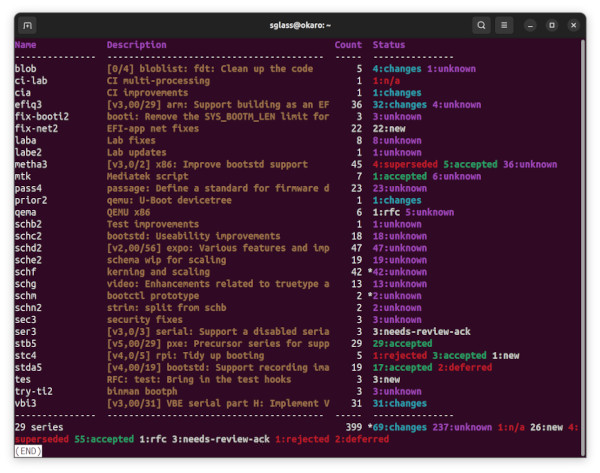
Multiple upstreams
If you send patches to more than one upstream tree (e.g. U-Boot mainline and the U-Boot concept tree), you can configure patman with multiple upstreams so that each series automatically uses the correct send settings for its destination. The trees may use different mailing lists, patchwork servers and SMTP credentials.
The key concepts are:
- Upstream
A remote git repository that you send patches to. Each upstream has a name (e.g.
us,ci) and a URL. Upstreams can also carry send settings: a patchwork URL, a sendemail identity, a To address and flags controllingget_maintainer.pland subject-tag processing. Usepatman upstreamcommands to manage these.- Patchwork project
The patchwork server tracks patches for a project (e.g.
U-Boot). Each upstream can point to a different patchwork server, and patman needs to know the project name on that server so it can look up series links. Usepatman patchwork set-projectto configure this per upstream.- Sendemail identity
Git supports multiple SMTP configurations via
[sendemail "<name>"]sections in.gitconfig. An upstream can reference one of these identities so that patman passes--identitytogit send-emailautomatically.- Series upstream
Each series can be associated with an upstream. When you send the series, patman looks up the upstream’s settings and applies them. This means the correct identity, To address and patchwork server are used without any extra flags on the command line.
Here is a step-by-step guide for a developer who sends to both U-Boot mainline and the U-Boot concept tree.
Step 1: Add your upstreams
First, add each upstream with its git remote URL, patchwork URL and send settings:
patman upstream add us https://source.denx.de/u-boot/u-boot.git \
    -p https://patchwork.ozlabs.org -t u-boot

patman upstream add ci https://concept.u-boot.org/u-boot/u-boot.git \
    -p https://patchwork.u-boot.org -t concept -I concept -m --no-tags
The options are:
-p/--patchwork-urlURL of the patchwork server for this upstream
-t/--series-toPatman alias for the To address (from your
~/.patmanalias file)-I/--identityGit sendemail identity (selects
[sendemail "<identity>"]from.gitconfig)-m/--no-maintainersSkip running
get_maintainer.pl--no-tagsSkip subject-tag alias processing
You can check your upstreams with:
patman upstream ls
You can also set a default upstream:
patman upstream default us
Step 2: Configure git sendemail identities
If your upstreams use different SMTP servers or credentials, set up git
sendemail identities in your .gitconfig. Each identity is a
[sendemail "<name>"] section that overrides the base [sendemail]
settings.
For example, to use one SMTP server by default and a different one for the concept tree (server names and credentials are just examples; substitute your own):
[sendemail]
    smtpserver = smtp.denx.de
    smtpserverport = 587
    smtpencryption = tls

[sendemail "concept"]
    smtpserver = smtp.gmail.com
    smtpserverport = 587
    smtpencryption = tls
    smtpuser = user@gmail.com
The base [sendemail] settings are used when no identity is specified. When
you add -I concept to an upstream, patman passes --identity=concept to
git send-email, which selects the matching section.
Step 3: Set up patchwork projects
Each upstream needs a patchwork project so that patman can find your series on the server:
patman patchwork set-project U-Boot us
patman patchwork set-project U-Boot ci
This looks up the project on the patchwork server associated with the upstream and stores the project ID locally.
Step 4: Set up aliases
Add To-address aliases to your ~/.patman file:
[alias]
u-boot: U-Boot Mailing List <u-boot@lists.denx.de>
concept: U-Boot Concept <concept@u-boot.org>
These are the names referenced by --series-to above.
Step 5: Add series with an upstream
When adding a series, specify which upstream it targets:
patman series add -S us
If you omit -S, you can set it later with:
patman series set-upstream <series> <upstream>
Step 6: Send
When you send a series, patman automatically applies the upstream’s settings:
patman series send
This looks up the upstream for the series and:
passes
--identitytogit send-emailif configuredsets the To address from
--series-toif noSeries-to:tag is presentskips
get_maintainer.plif--no-maintainersis setskips tag processing if
--no-tagsis set
If the series has a Series-to: tag that does not match the upstream’s
expected To address, patman raises an error. This prevents accidentally sending
to the wrong mailing list.
Updating upstream settings
To change settings on an existing upstream, use upstream set:
patman upstream set ci -I chromium
patman upstream set us -p https://patchwork.ozlabs.org
The same flags as upstream add are available, plus --maintainers and
--tags to re-enable options that were previously disabled.
General points
When you change back to the us-cmd branch days or weeks later all your information is still there, safely stored in the commits. You don’t need to remember what version you are up to, who you sent the last lot of patches to, or anything about the change logs.
If you put tags in the subject, patman will Cc the maintainers automatically in many cases.
If you want to keep the commits from each series you sent so that you can compare change and see what you did, you can either create a new branch for each version, or just tag the branch before you start changing it:
git tag sent/us-cmd-rfc
# ...later...
git tag sent/us-cmd-v2
If you want to modify the patches a little before sending, you can do this in your editor, but be careful!
If you want to run git send-email yourself, use the -n flag which will print out the command line patman would have used.
It is a good idea to add the change log info as you change the commit, not later when you can’t remember which patch you changed. You can always go back and change or remove logs from commits.
Some mailing lists have size limits and when we add binary contents to our patches it’s easy to exceed the size limits. Use “–no-binary” to generate patches without any binary contents. You are supposed to include a link to a git repository in your “Commit-notes”, “Series-notes” or “Cover-letter” for maintainers to fetch the original commit.
Patches will have no changelog entries for revisions where they did not change. For clarity, if there are no changes for this patch in the most recent revision of the series, a note will be added. For example, a patch with the following tags in the commit:
Series-version: 5
Series-changes: 2
- Some change

Series-changes: 4
- Another change
would have a changelog of::
(no changes since v4)

Changes in v4:
- Another change

Changes in v2:
- Some change
Other thoughts
This script has been split into sensible files but still needs work. Most of these are indicated by a TODO in the code.
It would be nice if this could handle the In-reply-to side of things.
The tests are incomplete, as is customary. Use the ‘test’ subcommand to run them:
$ patman test
The test command is only shown when the test data files are present; they ship with the source checkout and the installed package.
Alternatively, you can run the test suite via Pytest:
$ pytest
Error handling doesn’t always produce friendly error messages - e.g. putting an incorrect tag in a commit may provide a confusing message.
There might be a few other features not mentioned in this README. They might be bugs. In particular, tags are case sensitive which is probably a bad thing.
AI-assisted patch review
Patman can review other people’s patches from Patchwork using a Claude AI agent, and create Gmail draft replies with the review comments.
Prerequisites
Install the required packages:
sudo apt install python3-google-auth python3-google-auth-oauthlib \
    python3-google-auth-httplib2 python3-googleapi
pip install claude-agent-sdk
Setting up Gmail API access
Go to https://console.cloud.google.com and create (or select) a project.
Enable the Gmail API:
Navigate to APIs & Services > Enabled APIs & services
Click Enable APIs and services, search for “Gmail API”, enable it
Configure the OAuth consent screen:
Navigate to APIs & Services > OAuth consent screen
Set publishing status to Testing
Under Test users, add your email address (e.g. sjg@chromium.org)
Create OAuth client credentials:
Navigate to APIs & Services > Credentials
Click Create Credentials > OAuth client ID
Application type: Desktop app
Download the JSON file
Save the credentials:
mkdir -p ~/.config/patman.d
mv ~/Downloads/client_secret_*.json ~/.config/patman.d/client_secret.json
The first time you create drafts, a browser window opens for OAuth
consent. After authentication, the token is cached in
~/.config/patman.d/ and reused for future runs.
Setting up Patchwork
Configure an upstream with its Patchwork URL:
patman upstream add us https://source.denx.de/u-boot/u-boot.git \
    --patchwork-url https://patchwork.ozlabs.org
patman patchwork set-project U-Boot us
Basic usage
Review a series by Patchwork link:
patman review -s 497923 -U us --reviewer 'Your Name <your@email>'
Or search by cover-letter title:
patman review -S 'boot/bootm: Disable interrupts' -U us \
    --reviewer 'Your Name <your@email>'
To review a single patch by its Patchwork patch ID (the series is found automatically):
patman review -p 2219748
Or search for a patch by title:
patman review -P 'Add SPL support for Qualcomm'
To review only specific patches by index within the series:
patman review -s 497923 -i 1,3,5
To create Gmail drafts threaded under the original emails:
patman review -s 497923 -U us \
    --reviewer 'Your Name <your@email>' \
    -d --gmail-account your@email
Use -n with -d for a dry run that shows what would be created
without calling the Gmail API.
Use --apply-only to download and apply patches without running the
AI review – useful for checking that patches apply cleanly.
By default the review branch is created from <upstream>/next when
that branch has commits ahead of <upstream>/master, and from
<upstream>/master otherwise. This tracks U-Boot’s release cadence:
right after a release next is merged into master and stays
empty until the next cycle’s RC1, so reviews land on master during
that window and switch back to next automatically once it
diverges. Use -b / --base-branch to override the choice for a
particular run:
patman review -s 497923 -U us -b us/master \
    --reviewer 'Your Name <your@email>'
Use -f / --force to re-review a series that has already been
reviewed. This deletes the old review records and runs the review
again:
patman review -s 497923 -U us -f --reviewer 'Your Name <your@email>'
If the reviewer email (from --reviewer or git config) differs from
the --gmail-account, patman sets the From header on the draft so
the email is sent with the correct identity.
How the review works
For each patch, the AI agent:
Studies all patches in the series to understand the overall design
Re-reads the specific patch in detail
Examines surrounding source code for context
Checks existing comments from other reviewers on Patchwork and avoids repeating points already made
Produces a structured review (GREETING/COMMENT/VERDICT format)
After all patches are reviewed, a refinement agent makes a second pass over the drafts to tighten the language, remove cross-patch duplicates and check voice consistency. Approved reviews without comments are excluded from refinement to preserve their quoted commit messages.
A mechanical cleanup step also runs to remove backticks and fix function
quoting style (e.g. malloc() not `malloc`).
Apply step
Before checking out the review branch, patman stashes any uncommitted changes – including untracked files – so build artefacts on the current branch don’t leak into the review. The original branch and stash are restored at the end of the run, including on failure.
If the apply agent finishes but the resulting branch holds fewer
commits than the series cover letter advertises, patman aborts with a
message of the form Only N of M patches applied to <branch>;
aborting. Fix the conflicts manually and retry. The database row
for the new version is rolled back so a retry starts from a clean
state.
Patchwork subcommands
Remove a patchwork project configuration:
patman patchwork rm [remote]
If no remote is given, the default (no-upstream) entry is deleted.
Review notes
The handle-reviews workflow produces a review-notes.txt file
describing how feedback was addressed. Store it in the database so
future versions can reference it:
patman series save-notes [notes-file]
The default filename is review-notes.txt. Display notes from all
previous versions:
patman series show-notes
Settings
Add these to your ~/.patman file to avoid repeating flags:
[settings]
signoff: Regards,\nSimon
spelling: British
The signoff is appended to reviews that have comments (not to
clean Reviewed-by-only replies). The spelling setting controls
the spelling convention used in review comments.
Voice learning
Build a voice profile so AI reviews match your writing style:
# From Gmail (searches your sent reviews to the mailing list)
patman review --learn-voice gmail -U us \
    --gmail-account your@email --reviewer 'Your Name <your@email>'

# From Patchwork (scans your comments on recent patches)
patman review --learn-voice patchwork -U us \
    --reviewer 'Your Name <your@email>'
Use --voice-count N to control how many reviews to collect
(default: 20). The voice profile is saved to
~/.config/patman.d/voice.md and automatically used in subsequent
reviews.
Syncing drafts
After editing and sending (or deleting) Gmail drafts:
patman review --sync --gmail-account your@email \
    --reviewer 'Your Name <your@email>'
This:
Detects which drafts have been sent and records the final email content in the database (for context when reviewing future versions)
Detects deleted drafts (review not sent)
Refines the voice profile if the sent text differs from the AI draft
Detects replies from the patch author or other reviewers
Generates response drafts when appropriate (e.g. answering questions, pushing back on objections, or conceding gracefully)
Review lifecycle
Each review goes through these states:
new: AI review generated, not yet sent
draft: Gmail draft created
sent: Draft was sent; body updated with actual sent content
deleted: Draft was deleted without sending
replied: Author or another reviewer has replied to our review
When reviewing a new version of a previously reviewed series, patman loads the previous review as context for the AI, so it can check whether earlier issues have been addressed.
Aliases
The review command supports aliases r and rev:
patman r -l 497923 -U us --reviewer 'Your Name <your@email>'
Database schema
Patman stores series tracking, review and workflow state in a SQLite
database (.patman.db) in the top-level git directory. The schema is
versioned and auto-migrated on startup (currently at v10).
Set the PATMAN_DB_DIR environment variable to use a database elsewhere
(~ is expanded). The variable names a directory in which patman looks
for .patman.db, mirroring the default layout. This is useful if you keep
a single ‘main’ patman database in one repo but want to run, for example,
patman review in another worktree or repo: the DB path is overridden but
git operations still run against the current repo. For instance:
export PATMAN_DB_DIR=~/u-boot
cd ~/some-other-tree
patman review -s my-series
The connection is opened in WAL mode (journal_mode=WAL,
synchronous=NORMAL) with a 30-second busy timeout, which lets multiple
patman invocations share the database safely: concurrent readers do not block
each other, and a writer only briefly excludes other writers. This means it is
fine to run, for example, patman status in one terminal while a long
patman review is running in another. WAL creates .patman.db-wal and
.patman.db-shm sidecar files alongside the database; they are managed by
SQLite and removed on a clean close, so copy or sync all three together if you
back the database up by hand.
The database allows patman to track a patch series across multiple versions, recording which patches belong to each version and how they map to patchwork entries. This means patman can detect when a new version of a series arrives, carry forward review tags and change logs from earlier versions, and show upstream progress without re-querying patchwork each time.
For AI-assisted review of other people’s patches, the database stores
the generated review text, Gmail draft IDs and thread state so that
patman can resume where it left off - showing stored reviews, creating
drafts for reviews that were not yet sent, detecting when drafts have
been sent or deleted, and providing previous review context when a new
version of the series is posted. Review-handling notes from the
handle-reviews workflow are also stored per-version so the AI has
context about what was changed and why.
Entity relationships
upstream 1---* patchwork        (patchwork.upstream references
                                 upstream.name)

series   1---* ser_ver          (ser_ver.series_id -> series.id)

ser_ver  1---* pcommit          (pcommit.svid -> ser_ver.id)

ser_ver  1---* review           (review.svid -> ser_ver.id)

series   1---* workflow          (workflow.series_id -> series.id)
A series represents a named patch series across all its versions. Each ser_ver is one version of that series (e.g. v1, v2), linked to patchwork by a series link. Each ser_ver has one pcommit per patch and zero or more review records (one per AI review).
Tables
series
Patman tracks series that you are working on so it can keep an eye on
any feedback from other people (from patchwork). Series that are being
reviewed (other people’s patches) are also stored here with
source='review'.
Column |
Type |
Description |
|---|---|---|
id |
INTEGER |
Primary key (auto-increment) |
name |
TEXT |
Series name (unique) |
desc |
TEXT |
Series description / cover-letter title |
archived |
BIT |
True if series is archived |
upstream |
TEXT |
Upstream name (added v5) |
source |
TEXT |
‘review’ for AI-reviewed series (added v8) |
ser_ver
Each time you send a new version of a series, patman creates a ser_ver record linking it to patchwork. This lets patman track review tags, change logs and upstream progress separately for each version. For AI-reviewed series, review-handling notes are stored here so the next version has context about what was changed.
Column |
Type |
Description |
|---|---|---|
id |
INTEGER |
Primary key (auto-increment) |
series_id |
INTEGER |
FK -> series.id |
version |
INTEGER |
Version number (1, 2, …) |
link |
TEXT |
Patchwork series link/ID |
cover_id |
INTEGER |
Patchwork cover letter ID (added v3) |
cover_num_comments |
INTEGER |
Number of comments on cover (added v3) |
name |
TEXT |
Cover letter name (added v3) |
archive_tag |
TEXT |
Git tag for archived version (added v4) |
desc |
TEXT |
Version description (added v6) |
notes |
TEXT |
Review-handling notes (added v10) |
pcommit
Each patch in a series version gets a pcommit record. Patman uses the
Change-Id to match patches across versions (so it knows which patch in
v2 corresponds to which patch in v1) and tracks the patchwork state and
comment count so patman series progress can show upstream status.
Column |
Type |
Description |
|---|---|---|
id |
INTEGER |
Primary key (auto-increment) |
svid |
INTEGER |
FK -> ser_ver.id |
seq |
INTEGER |
Patch sequence (0-based) |
subject |
TEXT |
Patch subject line |
patch_id |
INTEGER |
Patchwork patch ID |
change_id |
TEXT |
Change-Id tag value |
state |
TEXT |
Patchwork state (e.g. ‘new’, ‘accepted’) |
num_comments |
INTEGER |
Number of patchwork comments |
review
When patman reviews someone else’s patches, it stores the generated
review email text here - one record per patch plus optionally the cover
letter. This allows patman to show the review again later, create Gmail
drafts from stored reviews, detect when drafts have been sent or
deleted, and provide the previous review as context when a new version
of the series arrives. When --sync detects that a draft was sent,
the body is updated to the final text the user actually sent (after any
manual edits), so the stored review reflects what was really posted to
the mailing list.
Column |
Type |
Description |
|---|---|---|
id |
INTEGER |
Primary key (auto-increment) |
svid |
INTEGER |
FK -> ser_ver.id |
seq |
INTEGER |
Patch sequence (0=cover, 1..N=patches) |
body |
TEXT |
Review email body text |
approved |
BIT |
True if Reviewed-by was given |
timestamp |
TEXT |
ISO datetime of review creation |
draft_id |
TEXT |
Gmail draft ID (added v9) |
status |
TEXT |
‘new’, ‘draft’, ‘sent’, ‘deleted’, ‘replied’ (added v9) |
gmail_msg_id |
TEXT |
Gmail message ID after sending (added v9) |
gmail_thread_id |
TEXT |
Gmail thread ID for replies (added v9) |
upstream
Patman needs to know about the upstream repositories you send patches
to. Each upstream has a git remote name, URL and optional patchwork
settings. One upstream can be marked as the default so you do not need
to specify -U on every command.
Column |
Type |
Description |
|---|---|---|
name |
TEXT |
Git remote name (unique, e.g. ‘us’) |
url |
TEXT |
Repository URL |
is_default |
BIT |
True if this is the default upstream |
patchwork_url |
TEXT |
Patchwork server URL (added v6) |
identity |
TEXT |
Git sendemail identity (added v6) |
series_to |
TEXT |
Default To: alias for series (added v6) |
no_maintainers |
BIT |
Skip get_maintainer.pl (added v6) |
no_tags |
BIT |
Skip subject-tag processing (added v6) |
patchwork
Each upstream can have a patchwork project associated with it. This stores the project name, ID and link name so patman can query patchwork for series status, review tags and comments. Multiple upstreams can point to different patchwork projects (e.g. U-Boot mainline vs a custodian tree).
Column |
Type |
Description |
|---|---|---|
name |
TEXT |
Project name (e.g. ‘U-Boot’) |
proj_id |
INTEGER |
Patchwork project ID |
link_name |
TEXT |
Patchwork link name (e.g. ‘uboot’) |
upstream |
TEXT |
Upstream name, or NULL for default |
workflow
Patman records workflow events such as when a series was sent, when
review feedback arrived and what needs attention. The patman workflow
todo command uses this to show outstanding tasks across all your
series.
Column |
Type |
Description |
|---|---|---|
id |
INTEGER |
Primary key (auto-increment) |
series_id |
INTEGER |
FK -> series.id |
action |
TEXT |
Workflow action (e.g. ‘sent’, ‘todo’) |
timestamp |
TEXT |
ISO datetime |
data |
TEXT |
JSON payload |
ser_ver_id |
INTEGER |
FK -> ser_ver.id (added v7b) |
schema_version
A single-row table that records which schema version the database is at. Patman checks this on startup and runs any needed migrations automatically.
Column |
Type |
Description |
|---|---|---|
version |
INTEGER |
Current schema version (currently 10) |
Changelog
All notable changes to this project are documented here. The format is based on Keep a Changelog and the project follows Semantic Versioning.
Unreleased
0.0.11 - 2026-06-18
Added
A project logo, shown in the documentation and the README.
Fixed
autolinkfinds a series whose cover-letter title changed in a later version: it searches patchwork by the current title rather than the title recorded when the version was created.
0.0.10 - 2026-06-15
Fixed
status --dest-branch(building a branch with the gathered review tags) works again on pygit2 1.16 and newer, wheremerge_trees()no longer accepts a branch object.
0.0.9 - 2026-06-15
Fixed
series statusandgathernow work on archived series, reading the patches from the archive tag rather than the deleted branch.
Changed
Update the pinned dependencies to current releases and support the pygit2 1.15 API.
Reorganise the documentation: it lives under
doc/, includes the changelog, can be built withmake -C doc html, and reads as a general patch tool rather than a U-Boot-specific one.
0.0.8 - 2026-06-08
Added
patman review -c/--contextpasses extra notes to the review agent for a single run – either a literal string or@pathto read the text from a file.patman series changes <text>records aSeries-changes(or, with-c,Cover-changes) bullet on the HEAD commit and amends it, instead of hand-editing the commit message.Documentation is now published at https://patman.readthedocs.io/.
Changed
Follow-up reviews respect the “say it in v1” convention: later versions confirm whether earlier feedback was addressed rather than piling on fresh nits.
A partial patch apply now warns and continues with whatever applied, instead of aborting and discarding the work.
Patman is now distributed as the self-contained
patch-managerpackage, withu_boot_pylibvendored in, installable from PyPI withpip install patch-manager.
Earlier releases
Releases 0.0.7 and earlier predate this changelog.